A backend is the application's route to a converter: the engine that opens the device, moves the samples and reports the errors. It is chosen under Preferences ▸ Audio, and which backends the list offers depends on where the application runs. In the browser the LOCAL backends are Web Audio and the QA40x over WebUSB - see Phonalyser.web in a browser - and the table below covers the engines a desktop application or a server bench runs: what you measure through when connected to a server. How a backend works inside - callbacks, ring buffers, exclusive modes - is described in Theory ▸ Audio backend; this page is the practical half: what exists where, and what the bench does to the hardware volume on your behalf.
| Backend | OS | Notes |
|---|---|---|
| WASAPI exclusive | Windows | The EXCL: devices - bit-exact exclusive mode through
the csjsound provider, and the route to the high sample rates.
Needs the csjsound natives beside the application. |
| WDM-KS | Windows | Kernel streaming through PortAudio - low latency, callback driven. |
| JavaSound (shared) | Windows | The system mixer's shared mode - always available, resampled by Windows, and therefore the fallback rather than the measurement route. |
| ALSA | Linux | JavaSound over the card's plughw device - direct card
access, one opener at a time. Port names and jack detection come
from alsa-utils. |
| CoreAudio | macOS | PortAudio over the CoreAudio HAL. Sample-rate lists are read from the device's own declared formats, not probed through the OS converter. |
| QA40x | all three | The QuantAsylum analyzer over USB - its own clock, ranges and device-provided calibration. See the QA40x sections of Preferences. |
| net | all three | A Phonalyser server's backends over the LAN - whatever the bench machine offers appears beside the local list. |
A card's hardware volume sits INSIDE the calibrated chain: a control away from where it stood during calibration scales every sample, and nothing in the reading says so. On Linux and macOS the bench therefore manages the opened device's own volume itself:
Some USB devices tear the CAPTURE stream on macOS at operating-system level: every capture shows ringing bursts and discontinuities while the analog output measures perfectly clean, and the very same recording made with Apple's own tools carries the same tear. One example bench device is the Cubilux CB5 - but the incompatibility is a property of the device-and-macOS pairing and can happen with other devices too. The same device may work flawlessly on Linux and Windows.
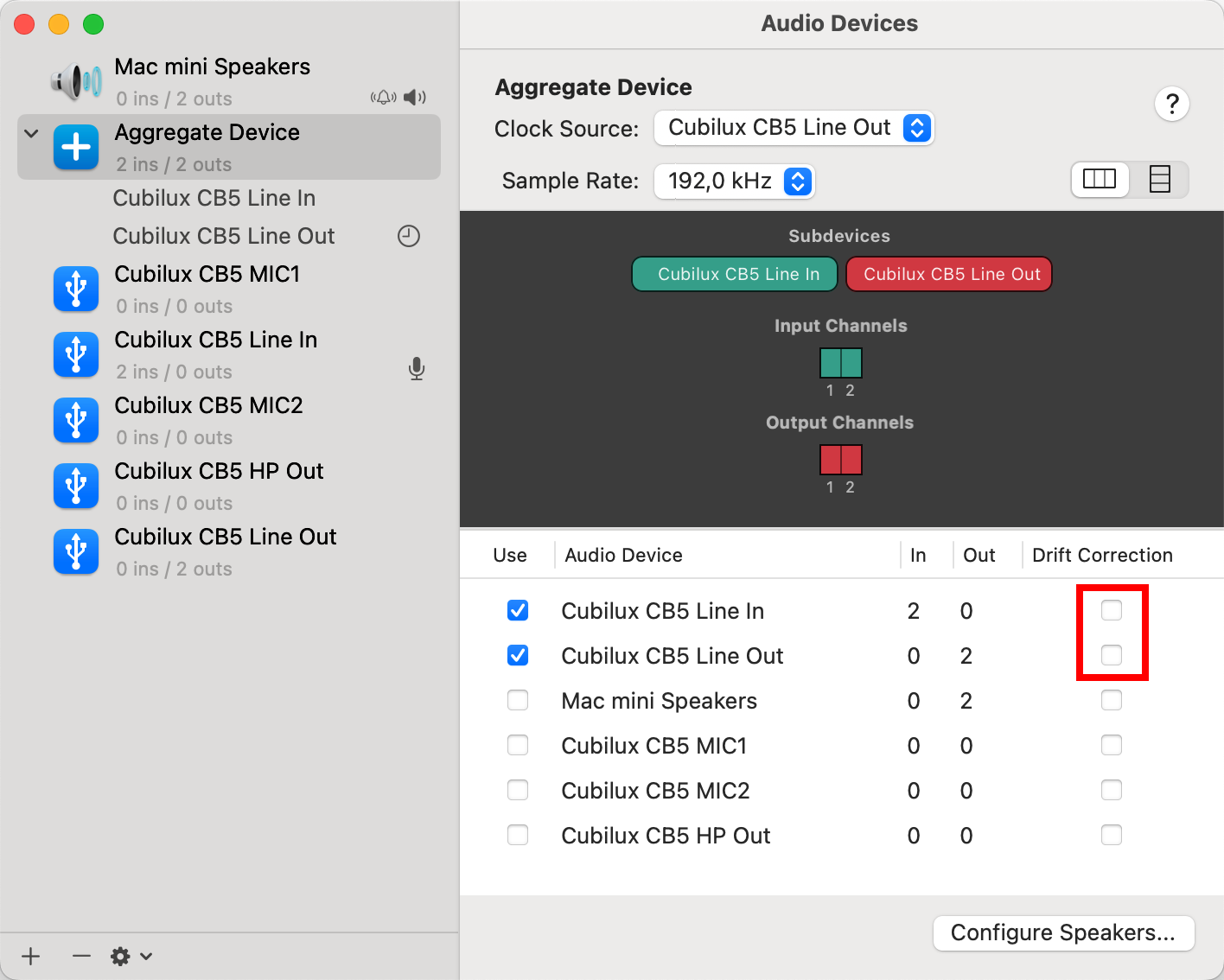
The workaround is an Aggregate Device. In Audio MIDI Setup create an aggregate and put the device's input and output into it, then select the aggregate on the bench. The aggregation layer adds the stream handling the device's own path lacks, and the captures come out clean.
An aggregate publishes no volume controls of its own; the bench pins and restores the volumes of its MEMBER devices instead, so the 0 dB discipline above holds through the aggregate too.